Saturday, December 31, 2022

the magic of cv and analogue sync?

ye olde synthesisers of yore used a DC analogue voltage as a control mechanism, this is a simple document for my own considerations.

there are 3 basic variations of "sequence" voltage sent 
- CONTROL VOLTAGE, sends variable voltages, used for wide ranging parameters such as pitch (or really anything with a patch point).

In regards to pitch there are different systems, however 2 major protocols have emerged [Volts per octave, Volts per hertz].
The voltages used varies per manufacturer/device. (with voltage range being related to the octave range of the device)

CV range examples (to demonstrate possible voltage range)
Volt/oct.  the voltage range demonstrates the octave range, eg 0V to 7V (7 octave range) and +/- 2V for pitch bend (2 octaves)
Hz/Volt.  0.0625V to approx 13V, (7.5 octaves)


- GATE, basically sends 2 opposing states, off/on (eg 0V -  5V).
These generally either open the VCA to allow signal through, or trigger an Envelope tied to the VCA

CV/ Gate are sufficient to send simple melodic info.

- TRIGGER, can be used to trigger notes or as a clock controller, it is a simple pulse (similar to a gate but with a set duration).

The Clock Trigger is a regular pattern of voltage pulses (generally 5V) signifiying timing steps. eg 24 pulses per quarter note (PPQN).

There are multiple variations of PPQN speed.
Roland DIN sync (SYNC24) is a regular pulse at 24ppqn, Korg uses 48ppqn.

Clock systems with a simple pulse use Tip Sleeve cables, others use Tip Ring Sleeve allowing a 0V=stop and 5V=start signal.
Other iterations of this format offer reset and fill in triggers.

Note triggers are single events that can be used to trigger drum sounds,  they can also be used as a step cycle for sequencers or arpeggiators (eg. a tom output from a TR-606 into the clock input for a SH-101)

for note triggers; 
V-trig  is basically Gate.
S-trig shorts the signal path and is not common.


Useful Device Information

Akai MAX49
CV - 0V to 5V (1V/octave)
GATE - ??

Arturia Beatstep Pro
CV. either
1 V/Oct (0V-10V corresponds to Midi note 0-127)

Behringer Neutron
CV - 1v/octave


Behringer TD-3
Sync in - More than 2.5v
CV out - 1V to 5V
Gate out - 0V to 12V

Korg Monotribe
is switchable between either Oct/V or Hz/v, also between active high/low for Gate.
CV must be limited to 5V and gate to 20V

KORG Volca Beat
SYNC IN - max 20V
SYNC OUT jack sends a 5V pulse of 15 ms at the beginning of each step.

Sunday, August 29, 2021

Meeblip Geode and Arturia Beatstep Pro weirdness

so today i discovered that the Beatstep Pro (along with other DAW controllers) spit out midi CC when pressing the transport buttons

default settings are

Stop - CC 54

Rec - CC 50

Play - CC 51


all well and good, except the Meeblip Geode uses these

CC 50    Oscillator Detune

CC 51    Filter Cutoff

CC 54    LFO Depth


so, you just need to go into the beatstep utility and change the CC #


symptoms - filter on the synth was changing to value 0 (play button), holding stop would cause the LFO Depth to max *whilst holding*


#tags

controller 54

controller 50

controller 51


Friday, April 30, 2021

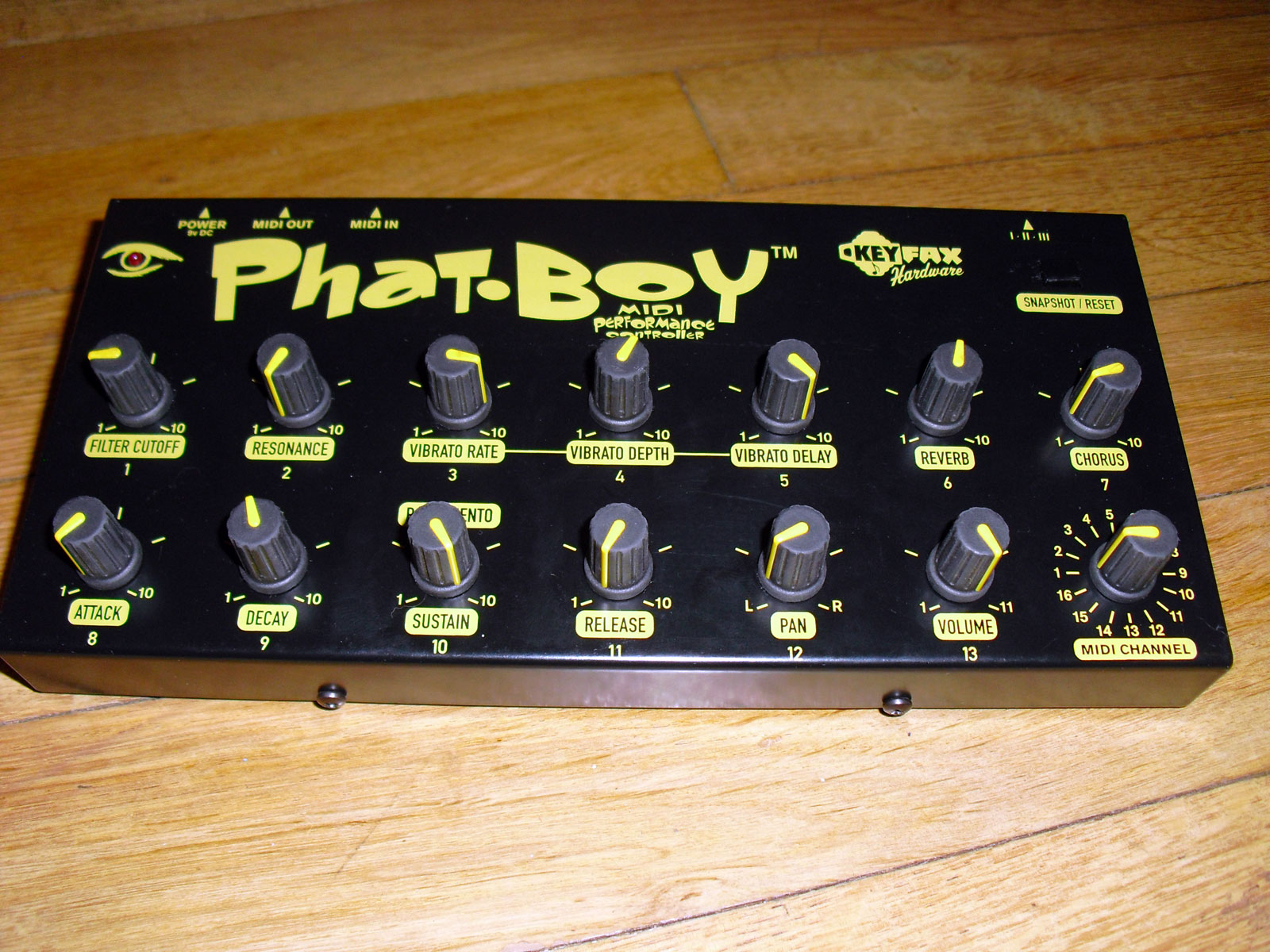
keyfax gmedia phatboy midi controller

the device is labelled as manufacture by either keyfax or g.media.

well out of production, the specs are still available on the original site and also backed up on the wayback machine.


specs

http://keyfax.com/keyfax/phatboy/phatspecs.html

https://web.archive.org/web/20210210210819/http://www.keyfax.com/keyfax/phatboy/phatspecs.html

tips

http://keyfax.com/keyfax/phatboy/phatips.html

https://web.archive.org/web/20200220204210/http://www.keyfax.com/keyfax/phatboy/phatips.html

compatibility

http://keyfax.com/keyfax/phatboy/phatcompat.html

https://web.archive.org/web/20210211051522/http://www.keyfax.com/keyfax/phatboy/phatcompat.html


pictures of v1

https://www.matrixsynth.com/2015/12/keyfax-phat-boy-midi-hardware.html?spref=pi


Friday, January 8, 2021

alesis multimix 16 firewire on Sierra and above?

the drivers do not install on more recent macOS versions.


you can disable a particular security setting to allow installation, then the device works correct!


in terminal

csrutil enable --without kext

and reboot


to re-enable

crsutil clear


._.

tips were taken from

https://fr.audiofanzine.com/console-fw-usb-mlan/alesis/MultiMix-16-FireWire/forums/t.604946,multimix-16-firewire-support-for-el-capitan,post.8694566.html

https://www.shoutpedia.com/enable-disable-system-integrity-protection-rootless-mac-os/

Tuesday, December 8, 2020

bootable USB macOS sierra - not a valid volume mount point

the basic technique of using

/Applications/Install\ macOS\ Sierra.app/Contents/Resources/createinstallmedia to create a USB installer drive fails with error

"not a valid volume mount point"

Simple work around is to modify one string inside a file inside the macOS Sierra.app

sudo plutil -replace CFBundleShortVersionString -string "12.6.03" /Applications/Install\ macOS\ Sierra.app/Contents/Info.plist


I did it manually by going into app and opening info.plist with textedit.

.
credit to
https://forums.macrumors.com/threads/not-a-valid-volume-mount-point-cant-make-bootable-drive.1935673/page-3?post=28197924#post-28197924

Thursday, October 1, 2020

update restore iphone to specific old version of ios

 when you connect the phone to itunes

see window update/restore whatever.

press Option+restore, this lets you choose any ipsw that you have available.

..

OK THAT DIDNT WORK AT ALL LIKE INTENDED .... WILL UPDATE LATER MAYBE


.

thanks to some random post on the internet (i cant find now) for this help.

Monday, September 23, 2019

Dell BIOS update workaround with no battery.

DELL XPS L501X with no Battery running an old BIOS.

tl/dr
extract bios from official release, phlash it from DOS.
...

running the official Bios phlasher fails because I dont have a battery.
error given -144
to sucessfully use the official phlash the laptop needs to be running off AC AND have battery plugged in.

when this fails it does however usefully extract the bios wph file,
in my case to
/USER/AppData/Local/Temp/WinPhlash64/BIOS1.WPH

USER is my username, which will vary on different systems, and you will also need to view hidden files and folders as Local is invisible.

-- now you need a bootable USB-stick to run DOS,
i used RUFUS https://rufus.ie
-- next a DOS version of WinPhlash
i used version 1.7.0.21 https://www.wimsbios.com/phoenixflasher.jsp

-- copy PHLASH16.EXE to the USB drive.
-- copy BIOS1.WPH and rename as BIOS.WPH to USB drive

-- reboot into DOS,
run PHLASH16.EXE

it beeps a lot and loudly, then is finished !!

** dont forget fucking up the BIOS can brick your laptop **

some of this info was supplied by this now deleted blog
https://webcache.googleusercontent.com/search?q=cache:qyhf_0TE20wJ:https://blog.howlin.se/bypassing-error-144-winphlash-on-a-dell-vostro-1520/+&cd=5&hl=en&ct=clnk&gl=au