Wednesday, June 21, 2023

novation ZeRO SL MkII ROW SELECT

NOVATION ZERO SL MKII ROW SELECT BUTTONS DO NOT EXIST


There are multiple instances of the manual referring to the Row Select buttons, however these do not exist!!

Holding down [preview] then allows you to use the lower double row of buttons for the same effect.

--
"You can toggle the display format of the CC Num setting between decimal and hexadecimal by pressing the ROW-SELECT button for the upper left-hand row of buttons."

[preview]+[any of the upper double row buttons]

--

Template Grouping - "To step through templates within a group press any of the row select buttons multiple times."

[preview]+[any of the double row buttons] - slightly inconsistent behaviour, the first press does not cycle, but the second does. however after release only one press is required :?


Thursday, May 18, 2023

BOSS SP-505 SmartMedia Card

i had an issue with my card, the sp-505 was not displaying the card option under the system menu.

this gave me 2 questions

  1. is the card option only displayed when a card is detected? answer. yes.
  2. is it a formatting issue and can i format it on PC? answer. no and i dont know.

i managed to dig up an old PC card reader and succesfully read the card.

before i tried PC formatting, i weirdly discovered that i had inserted the card upside down .. turning it up the correct way answered my 1st question. (i must admit to assuming that because the card was inserted fully it was the correct way up).

i formatted the card in the SP-505, and it's Fat12 (reported by lubuntu).

there is no simple right click to format to Fat12, formatting to Fat under win10 results in being unreadable by the SP-505.

at this point i can't be bothered working out how to format using PC. maybe later.


Sunday, February 26, 2023

default DNS settings Archer vr1600v v1.0

 Advanced > Network > DSL

edit whichever is connected.


click on advanced to reveal DNS settings

Saturday, December 31, 2022

the magic of cv and analogue sync?

ye olde synthesisers of yore used a DC analogue voltage as a control mechanism, this is a simple document for my own considerations.

there are 3 basic variations of "sequence" voltage sent 
- CONTROL VOLTAGE, sends variable voltages, used for wide ranging parameters such as pitch (or really anything with a patch point).

In regards to pitch there are different systems, however 2 major protocols have emerged [Volts per octave, Volts per hertz].
The voltages used varies per manufacturer/device. (with voltage range being related to the octave range of the device)

CV range examples (to demonstrate possible voltage range)
Volt/oct.  the voltage range demonstrates the octave range, eg 0V to 7V (7 octave range) and +/- 2V for pitch bend (2 octaves)
Hz/Volt.  0.0625V to approx 13V, (7.5 octaves)


- GATE, basically sends 2 opposing states, off/on (eg 0V -  5V).
These generally either open the VCA to allow signal through, or trigger an Envelope tied to the VCA

CV/ Gate are sufficient to send simple melodic info.

- TRIGGER, can be used to trigger notes or as a clock controller, it is a simple pulse (similar to a gate but with a set duration).

The Clock Trigger is a regular pattern of voltage pulses (generally 5V) signifiying timing steps. eg 24 pulses per quarter note (PPQN).

There are multiple variations of PPQN speed.
Roland DIN sync (SYNC24) is a regular pulse at 24ppqn, Korg uses 48ppqn.

Clock systems with a simple pulse use Tip Sleeve cables, others use Tip Ring Sleeve allowing a 0V=stop and 5V=start signal.
Other iterations of this format offer reset and fill in triggers.

Note triggers are single events that can be used to trigger drum sounds,  they can also be used as a step cycle for sequencers or arpeggiators (eg. a tom output from a TR-606 into the clock input for a SH-101)

for note triggers; 
V-trig  is basically Gate.
S-trig shorts the signal path and is not common.


Useful Device Information

Akai MAX49
CV - 0V to 5V (1V/octave)
GATE - ??

Arturia Beatstep Pro
CV. either
1 V/Oct (0V-10V corresponds to Midi note 0-127)

Behringer Neutron
CV - 1v/octave


Behringer TD-3
Sync in - More than 2.5v
CV out - 1V to 5V
Gate out - 0V to 12V

Korg Monotribe
is switchable between either Oct/V or Hz/v, also between active high/low for Gate.
CV must be limited to 5V and gate to 20V

KORG Volca Beat
SYNC IN - max 20V
SYNC OUT jack sends a 5V pulse of 15 ms at the beginning of each step.

Sunday, August 29, 2021

Meeblip Geode and Arturia Beatstep Pro weirdness

so today i discovered that the Beatstep Pro (along with other DAW controllers) spit out midi CC when pressing the transport buttons

default settings are

Stop - CC 54

Rec - CC 50

Play - CC 51


all well and good, except the Meeblip Geode uses these

CC 50    Oscillator Detune

CC 51    Filter Cutoff

CC 54    LFO Depth


so, you just need to go into the beatstep utility and change the CC #


symptoms - filter on the synth was changing to value 0 (play button), holding stop would cause the LFO Depth to max *whilst holding*


#tags

controller 54

controller 50

controller 51


Friday, April 30, 2021

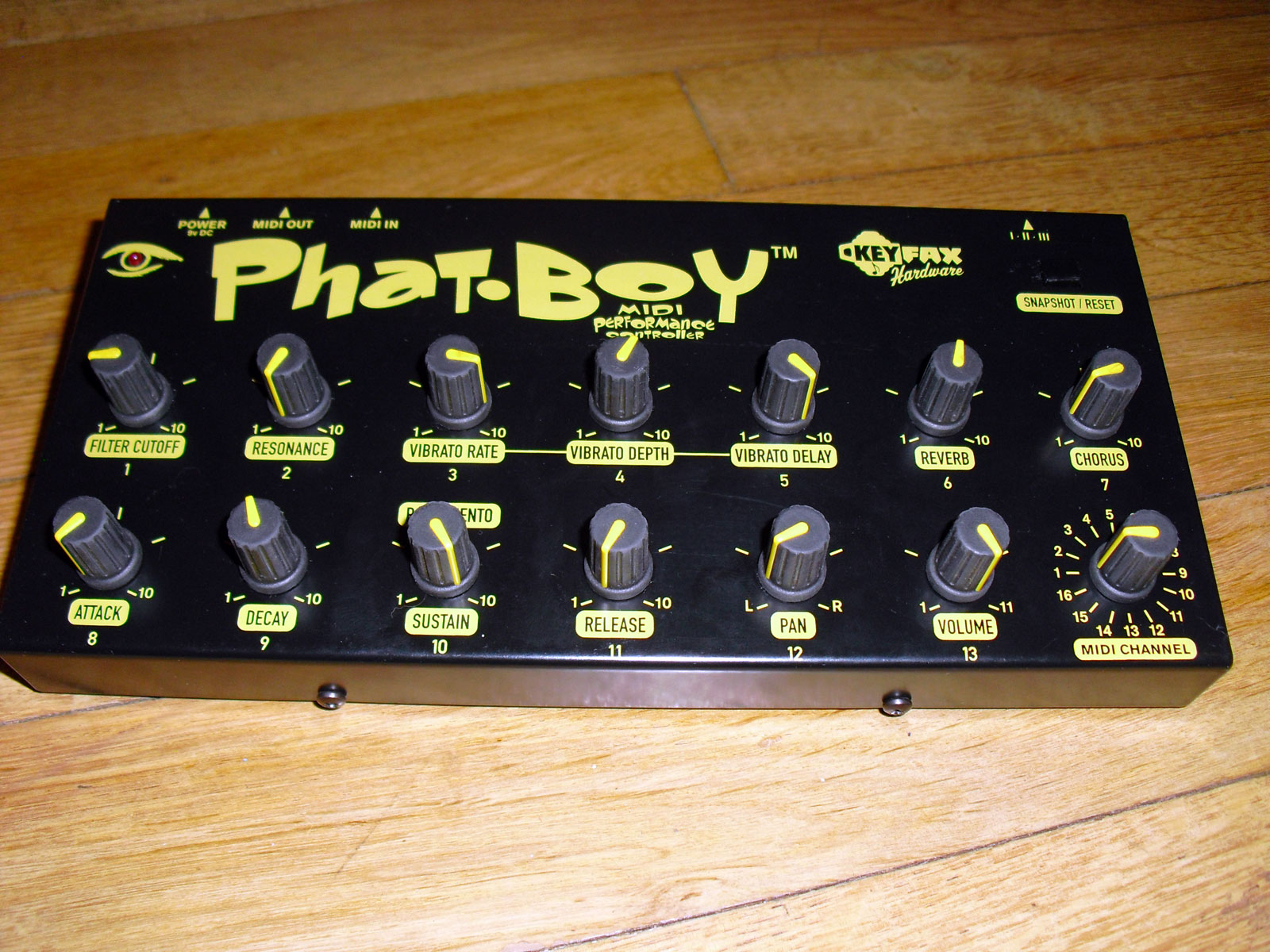
keyfax gmedia phatboy midi controller

the device is labelled as manufacture by either keyfax or g.media.

well out of production, the specs are still available on the original site and also backed up on the wayback machine.


specs

http://keyfax.com/keyfax/phatboy/phatspecs.html

https://web.archive.org/web/20210210210819/http://www.keyfax.com/keyfax/phatboy/phatspecs.html

tips

http://keyfax.com/keyfax/phatboy/phatips.html

https://web.archive.org/web/20200220204210/http://www.keyfax.com/keyfax/phatboy/phatips.html

compatibility

http://keyfax.com/keyfax/phatboy/phatcompat.html

https://web.archive.org/web/20210211051522/http://www.keyfax.com/keyfax/phatboy/phatcompat.html


pictures of v1

https://www.matrixsynth.com/2015/12/keyfax-phat-boy-midi-hardware.html?spref=pi


Friday, January 8, 2021

alesis multimix 16 firewire on Sierra and above?

the drivers do not install on more recent macOS versions.


you can disable a particular security setting to allow installation, then the device works correct!


in terminal

csrutil enable --without kext

and reboot


to re-enable

crsutil clear


._.

tips were taken from

https://fr.audiofanzine.com/console-fw-usb-mlan/alesis/MultiMix-16-FireWire/forums/t.604946,multimix-16-firewire-support-for-el-capitan,post.8694566.html

https://www.shoutpedia.com/enable-disable-system-integrity-protection-rootless-mac-os/