Sunday, May 3, 2026

forcing integrated graphics on macbook

 gfxCardStatus is a well known app that enables users to control how their mac uses the integrated/discrete graphics.

switchGPU is a wrapper for the above, that runs it on startup and forces a setting.


https://github.com/codykrieger/gfxCardStatus

https://github.com/mjroeleveld/switchGPU

Wednesday, April 29, 2026

Running Snow Leopard on a Late 2011 Macbook Pro to avoid dead discrete GPU.

UPDATE : macbook no longer boots at all. I guess she's dead Jim.


I have a collection of old firewire devices and am going to have a go running my problematic MacBook as the controller/interface for these devices,

The plan is to run this MacBook only using integraded graphics Intel HD3000 (bypassing the AMD Radeon 6770M).

As these devices vary in age it also makes sense to use older MacOS versions.


Running the MacBook seems possible by removing kexts from the OS to prevent ever switching, but I am also looking for device compatibility so I will try installing Snow Leopard, which shouldn't require removing kexts, as it does not include support for the 6770M.

A little history
2010 MacBook Pro's featured both Core2Duo's and the i5/7 chips, and were shipped with 10.6.3.
Early 2011- 2nd generation i5/7, and were shipped with 10.6.6.
Late 2011 - 2nd generation 15/7, shipped with 10.7.2

Snow Leopard 10.6.6 seems to be the first version that supports the i7-2760QM, but cannot be installed directly.

The general technique is to create an Install Disk, boot a computer compatible with 10.6.7, then install it somewhere handy. Boot the MacBook in Target Disk mode, create an image and copy it across, physically move the hard drive. Many options.

My MacBook is already in some disrepair and no hard drive (HDD) installed (I also have no idea where the screws for the back cover are), so my choice was to put a handy HDD into an external enclosure and attached.

My process was to install 10.6 onto the only hand mac i had, which is a 2009 iMac with a Core2Duo processor. However at this point I wasn't fully versed in version history so after putting the HDD into the macbook, resulted in a kernel panic over cpu incompatibility.

panic(cpu 0 caller 0x558c2459: "Unsupported CPU: family = 0x06, model = 0x2a, stepping = 0x7"@/SourceCache/AppleIntelCPUPowerManagement/AppleIntelCPUPowerManagement-90/pmProcessor.c:210

Using Target Disk mode as an external drive for the old iMac, booting into 10.6 and updating to 10.6.8 fixed this issue.


It's all good and working well.

UPDATE : had problem with it booting into a blue screen. I reset NVRAM and will turn off all sleep functions.


The next job is checking version histories for the various drivers and softwares such as MOTU AudioDesk and Cuemix.


Compatible with 10.6.8
PreSonus Universal Control


gpu-problem-boot-hangs-on-grey-screen - https://apple.stackexchange.com/a/295805/670067

Wednesday, September 17, 2025

basic setup openmediavault 6.5.0

once openmediavault is installed, basic guide to setup shared folder/drives.


#Enable Samba

Services > Smb/cifs > Settings > Enable
Apply


#Create User

Users > Users > Create (+) >
Save > Apply

#Mount each existing hd/partition

Storage > File Systems > MOUNT (>) > select hd/partition (add tag for useful display info)
Apply


#Create Shared Folders - I am not precious and simply sharing each partition.

Storage > Shared Folders > Create (+) >
Apply

**Name - name on network

File System - location of share. / for root of partition, /folder for location.**

#Add share to Samba

SMB/CIFS > Shares > Create (+) >
Apply


#Check User Permissions

Users > Users > click on user > Shared Folder Permissions (Folder/Key icon) >
Apply


-- Other Notes --

During install, if you skip any steps (I skipped network config), to use CLI command
# omv-firstai

When using terminal - by default mounted partitions are located in /srv by their UUID. There is a symlink plugin to make that easier using webGUI.

Monday, July 21, 2025

Change column widths in Blogger

Go to Themes, Go to Edit HTML. Change highlighted values.

/* Page Structure
----------------------------------------------- */
#outer-wrapper {
  position:relative;
  top:4px;
  left:4px;
  background: #999;
  width:1050px;
  margin:10px auto;
  text-align:left;
  font: $bodyFont;
  }

#content-wrapper {
  width:100%;
}
#main-wrapper {
  background: $mainBgColor url("http://www.blogblog.com/no897/corner_main.gif") no-repeat right top;
  width:700px;
  float:left;
  color:$mainTextColor;
  font-size: 85%;
  word-wrap: break-word; /* fix for long text breaking sidebar float in IE */
  overflow: hidden;     /* fix for long non-text content breaking IE sidebar float */
  }
#main {


https://www.sitepoint.com/community/t/how-can-i-increase-the-width-of-my-post-in-blogger-blogspot/428012/2

Tuesday, February 6, 2024

Reverse Osmosis Filter

 quote

The truth is that residential RO systems have a waste: pure water ratio that is set by the membrane supplier. The ‘waste’ water is required to flush the membrane and ensures that you can achieve a reasonable life span of 2-3 years before having to replace the membrane.  Any low ratio like 1:1 will ensure that the membrane needs to be replaced well before the typical life expectancy –ironically a bonus for the unscrupulous salesman who promised you the outrageous ratio.

Residential RO systems have a waste: pure water ratio of 3 to 5 to 1 (average 4:1) and the actual ratio should depend on a number of factors including water quality ,pH,  pressure and temperature.  In reality this ratio is set and predetermined, thanks to a flow restrictor that is sized according to the membrane output.


https://pacificwater.com.au/residential-ro-systems-waste-to-pure-ware-ratio-explained/

Sunday, October 22, 2023

 arturia microbrute manuals.

today i learned the microbrute has various settings controlled via CC values. this is all hidden in the 

ARTURIA MICROBRUTE CONNECTION USER MANUAL.


now somewhat weirdly there is no evidence this file even exists on the official site and i've only come across it here

https://www.manualslib.com/manual/1172383/Arturia-Microbrute-Connection.html


also found the Oscillator Calibration document (if you ever wondered what the two microscrews are at the back of the unit?!) AND the Board Schematics here

https://www.synthxl.com/arturia-microbrute/


for ease of access, here is the list of Parameters available through CC


ParameterMidi CC #Value
Receive Channel1021 to 16, 17=All
Send Channel1031 to 16
Seq Retrig1040 to 41 = Reset. 42 to 83 = Legato. 84 to 127 = None.
Seq Play Mode1050 to 63 = Hold. 64 to 127 = Note On.
Next Seq Mode1060 to 41 = End. 42 to 83 = Instant Reset. 84 to 127 = Instant Continuous.
Seq Step Size1070 to 29 = ¼. 30 to 59 = 1/8. 60 to 89 = 1/16. 90 to 127 = 1/32.
Sync Source1080 to 41 = Auto. 42 to 83 = Int. 84 to 127 = Ext.
Env Legato Mode1090 to 63 = Off. 64 to 127 = On.
LFO Retrig Mode1100 to 63 = Off. 64 to 127 = On.
Note Priority1110 to 41 = Last. 42 to 83 = Low, 84 to 127 = High.
Velocity Curve1120 to 41 = Lin. 42 to 83 = Log. 84 to 127 = Anti Log.
Gate Length1130 to 41 = Short. 42 to 83 = Med. 84 to 127 = Long
Seq Step/Gate Mode1140 to 63 = Clk. 64 to 127 = Gate/Tap.
Pitch Bend RangeRPN 061 to 12
Local ON/OFF1220 = or 127


as a bonus, i also discovered the minibrute has similar parameter modification capabilities as documented in the MiniBrute Connection software editor manual ..
https://dl.arturia.net/products/minibrute/manual/MINIBRUTE_CONNECTION_Manual_EN.pdf

Friday, September 22, 2023

roland gaia sh01 sound designer software

 Roland Gaia

Sound Designer Pack. this handy post includes links to a huge grab bag of stuff - including all ze drivers.

https://forums.rolandclan.com/viewtopic.php?p=327289#p327289


as it mentions, the full set of drivers is still available from Roland

https://www.roland.com/us/support/by_product/gaia_sh-01/updates_drivers/


..

the macOS installer is also available further in that thread 

https://forums.rolandclan.com/viewtopic.php?p=330079#p330079

i made a single attempt at installing the sound designer on macOS 13 with no success. 

met with error "the installer could not install the software because there was no software to install"


after some consideration i  will probably try it  on windows rather  than work this issue out.


..

this java GAIA tool seems very handy, but i am currently after something to mess with system settings so i am hoping the above does what i hope.

http://www.grauw.nl/projects/gaia-tool/

Wednesday, June 21, 2023

novation ZeRO SL MkII ROW SELECT

NOVATION ZERO SL MKII ROW SELECT BUTTONS DO NOT EXIST


There are multiple instances of the manual referring to the Row Select buttons, however these do not exist!!

Holding down [preview] then allows you to use the lower double row of buttons for the same effect.

--
"You can toggle the display format of the CC Num setting between decimal and hexadecimal by pressing the ROW-SELECT button for the upper left-hand row of buttons."

[preview]+[any of the upper double row buttons]

--

Template Grouping - "To step through templates within a group press any of the row select buttons multiple times."

[preview]+[any of the double row buttons] - slightly inconsistent behaviour, the first press does not cycle, but the second does. however after release only one press is required :?


Thursday, May 18, 2023

BOSS SP-505 SmartMedia Card

i had an issue with my card, the sp-505 was not displaying the card option under the system menu.

this gave me 2 questions

  1. is the card option only displayed when a card is detected? answer. yes.
  2. is it a formatting issue and can i format it on PC? answer. no and i dont know.

i managed to dig up an old PC card reader and succesfully read the card.

before i tried PC formatting, i weirdly discovered that i had inserted the card upside down .. turning it up the correct way answered my 1st question. (i must admit to assuming that because the card was inserted fully it was the correct way up).

i formatted the card in the SP-505, and it's Fat12 (reported by lubuntu).

there is no simple right click to format to Fat12, formatting to Fat under win10 results in being unreadable by the SP-505.

at this point i can't be bothered working out how to format using PC. maybe later.


Sunday, February 26, 2023

default DNS settings Archer vr1600v v1.0

 Advanced > Network > DSL

edit whichever is connected.


click on advanced to reveal DNS settings

Saturday, December 31, 2022

the magic of cv and analogue sync?

ye olde synthesisers of yore used a DC analogue voltage as a control mechanism, this is a simple document for my own considerations.

there are 3 basic variations of "sequence" voltage sent 
- CONTROL VOLTAGE, sends variable voltages, used for wide ranging parameters such as pitch (or really anything with a patch point).

In regards to pitch there are different systems, however 2 major protocols have emerged [Volts per octave, Volts per hertz].
The voltages used varies per manufacturer/device. (with voltage range being related to the octave range of the device)

CV range examples (to demonstrate possible voltage range)
Volt/oct.  the voltage range demonstrates the octave range, eg 0V to 7V (7 octave range) and +/- 2V for pitch bend (2 octaves)
Hz/Volt.  0.0625V to approx 13V, (7.5 octaves)


- GATE, basically sends 2 opposing states, off/on (eg 0V -  5V).
These generally either open the VCA to allow signal through, or trigger an Envelope tied to the VCA

CV/ Gate are sufficient to send simple melodic info.

- TRIGGER, can be used to trigger notes or as a clock controller, it is a simple pulse (similar to a gate but with a set duration).

The Clock Trigger is a regular pattern of voltage pulses (generally 5V) signifiying timing steps. eg 24 pulses per quarter note (PPQN).

There are multiple variations of PPQN speed.
Roland DIN sync (SYNC24) is a regular pulse at 24ppqn, Korg uses 48ppqn.

Clock systems with a simple pulse use Tip Sleeve cables, others use Tip Ring Sleeve allowing a 0V=stop and 5V=start signal.
Other iterations of this format offer reset and fill in triggers.

Note triggers are single events that can be used to trigger drum sounds,  they can also be used as a step cycle for sequencers or arpeggiators (eg. a tom output from a TR-606 into the clock input for a SH-101)

for note triggers; 
V-trig  is basically Gate.
S-trig shorts the signal path and is not common.


Useful Device Information

Akai MAX49
CV - 0V to 5V (1V/octave)
GATE - ??

Arturia Beatstep Pro
CV. either
1 V/Oct (0V-10V corresponds to Midi note 0-127)

Behringer Neutron
CV - 1v/octave


Behringer TD-3
Sync in - More than 2.5v
CV out - 1V to 5V
Gate out - 0V to 12V

Korg Monotribe
is switchable between either Oct/V or Hz/v, also between active high/low for Gate.
CV must be limited to 5V and gate to 20V

KORG Volca Beat
SYNC IN - max 20V
SYNC OUT jack sends a 5V pulse of 15 ms at the beginning of each step.

Sunday, August 29, 2021

Meeblip Geode and Arturia Beatstep Pro weirdness

so today i discovered that the Beatstep Pro (along with other DAW controllers) spit out midi CC when pressing the transport buttons

default settings are

Stop - CC 54

Rec - CC 50

Play - CC 51


all well and good, except the Meeblip Geode uses these

CC 50    Oscillator Detune

CC 51    Filter Cutoff

CC 54    LFO Depth


so, you just need to go into the beatstep utility and change the CC #


symptoms - filter on the synth was changing to value 0 (play button), holding stop would cause the LFO Depth to max *whilst holding*


#tags

controller 54

controller 50

controller 51


Friday, April 30, 2021

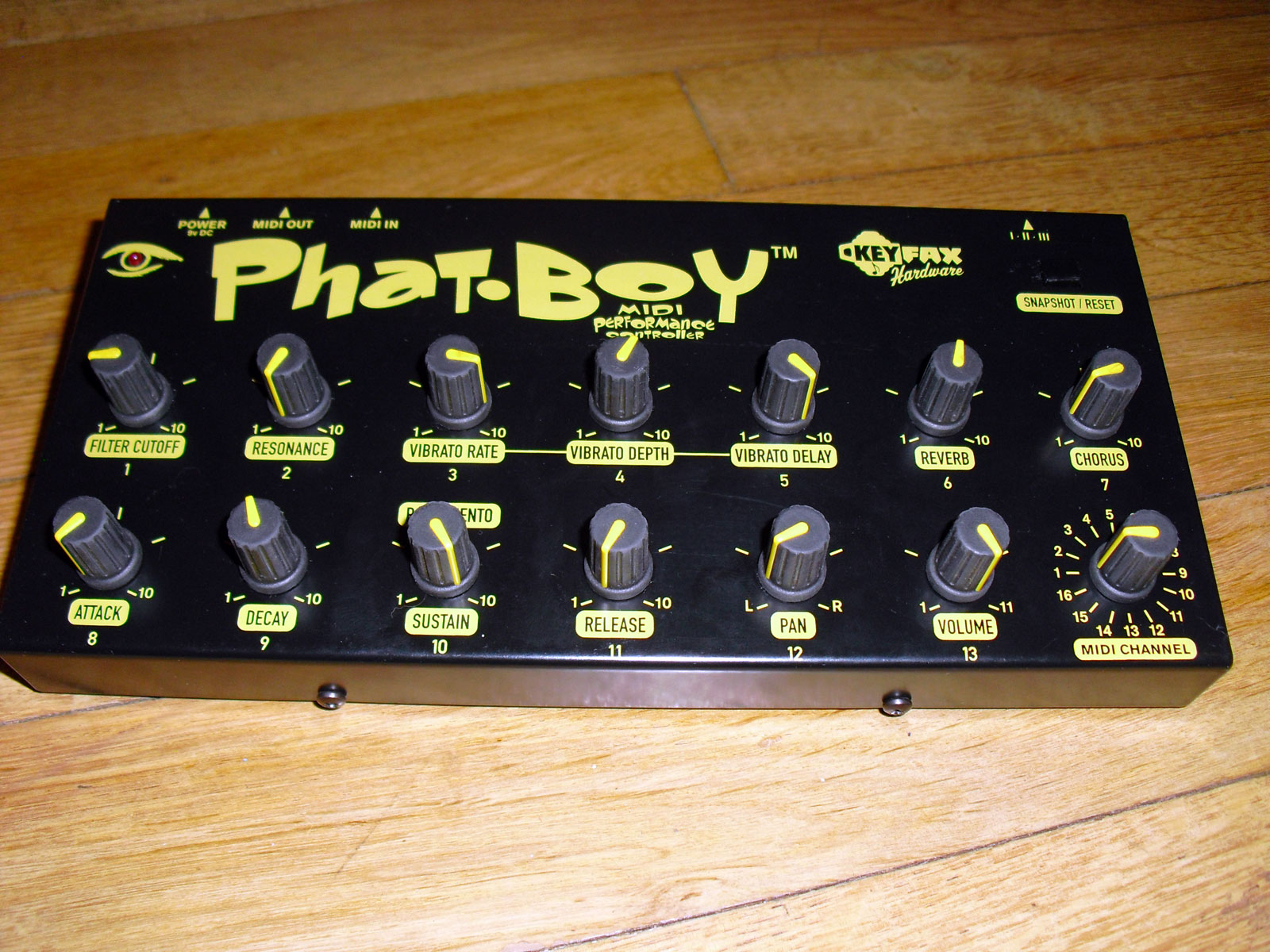
keyfax gmedia phatboy midi controller

the device is labelled as manufacture by either keyfax or g.media.

well out of production, the specs are still available on the original site and also backed up on the wayback machine.


specs

http://keyfax.com/keyfax/phatboy/phatspecs.html

https://web.archive.org/web/20210210210819/http://www.keyfax.com/keyfax/phatboy/phatspecs.html

tips

http://keyfax.com/keyfax/phatboy/phatips.html

https://web.archive.org/web/20200220204210/http://www.keyfax.com/keyfax/phatboy/phatips.html

compatibility

http://keyfax.com/keyfax/phatboy/phatcompat.html

https://web.archive.org/web/20210211051522/http://www.keyfax.com/keyfax/phatboy/phatcompat.html


pictures of v1

https://www.matrixsynth.com/2015/12/keyfax-phat-boy-midi-hardware.html?spref=pi


Friday, January 8, 2021

alesis multimix 16 firewire on Sierra and above?

the drivers do not install on more recent macOS versions.


you can disable a particular security setting to allow installation, then the device works correct!


in terminal

csrutil enable --without kext

and reboot


to re-enable

crsutil clear


._.

tips were taken from

https://fr.audiofanzine.com/console-fw-usb-mlan/alesis/MultiMix-16-FireWire/forums/t.604946,multimix-16-firewire-support-for-el-capitan,post.8694566.html

https://www.shoutpedia.com/enable-disable-system-integrity-protection-rootless-mac-os/

Tuesday, December 8, 2020

bootable USB macOS sierra - not a valid volume mount point

the basic technique of using

/Applications/Install\ macOS\ Sierra.app/Contents/Resources/createinstallmedia to create a USB installer drive fails with error

"not a valid volume mount point"

Simple work around is to modify one string inside a file inside the macOS Sierra.app

sudo plutil -replace CFBundleShortVersionString -string "12.6.03" /Applications/Install\ macOS\ Sierra.app/Contents/Info.plist


I did it manually by going into app and opening info.plist with textedit.

.
credit to
https://forums.macrumors.com/threads/not-a-valid-volume-mount-point-cant-make-bootable-drive.1935673/page-3?post=28197924#post-28197924

Thursday, October 1, 2020

update restore iphone to specific old version of ios

 when you connect the phone to itunes

see window update/restore whatever.

press Option+restore, this lets you choose any ipsw that you have available.

..

OK THAT DIDNT WORK AT ALL LIKE INTENDED .... WILL UPDATE LATER MAYBE


.

thanks to some random post on the internet (i cant find now) for this help.

Monday, September 23, 2019

Dell BIOS update workaround with no battery.

DELL XPS L501X with no Battery running an old BIOS.

tl/dr
extract bios from official release, phlash it from DOS.
...

running the official Bios phlasher fails because I dont have a battery.
error given -144
to sucessfully use the official phlash the laptop needs to be running off AC AND have battery plugged in.

when this fails it does however usefully extract the bios wph file,
in my case to
/USER/AppData/Local/Temp/WinPhlash64/BIOS1.WPH

USER is my username, which will vary on different systems, and you will also need to view hidden files and folders as Local is invisible.

-- now you need a bootable USB-stick to run DOS,
i used RUFUS https://rufus.ie
-- next a DOS version of WinPhlash
i used version 1.7.0.21 https://www.wimsbios.com/phoenixflasher.jsp

-- copy PHLASH16.EXE to the USB drive.
-- copy BIOS1.WPH and rename as BIOS.WPH to USB drive

-- reboot into DOS,
run PHLASH16.EXE

it beeps a lot and loudly, then is finished !!

** dont forget fucking up the BIOS can brick your laptop **

some of this info was supplied by this now deleted blog
https://webcache.googleusercontent.com/search?q=cache:qyhf_0TE20wJ:https://blog.howlin.se/bypassing-error-144-winphlash-on-a-dell-vostro-1520/+&cd=5&hl=en&ct=clnk&gl=au


Friday, January 13, 2017

virtualising raspberry pi.


seems trick is because pi uses ARM processor, need to use QEMU virtualiser.

the basic requirements are
QEMU
kernel to emulate physical environment
OS img to run


here's a simple download, runs on windows, once downloaded and unzipped, run.bat and bob's your aunties live in lover.

http://www.makeuseof.com/tag/emulate-raspberry-pi-pc/

longer do it yourself version with outdated versions

https://www.pcsteps.com/1199-raspberry-pi-emulation-for-windows-qemu/


tips. 


change screen resolution for gui.

sudo nano /etc/X11/xorg.conf

Type the following into the file you have just created:-

Section "Screen"
Identifier "Default Screen"
SubSection "Display"
Depth 16
Modes "800x600" "640x480"
EndSubSection
EndSection


http://web.archive.org/web/20150103125008/http://www.soslug.org/wiki/raspberry_pi_emulation


change VM img/HDD size.

qemu-img.exe resize 2015-02-16-raspbian-wheezy.img +10G

when you run the OS, you will then need to "Expand Filesystem" to fill entire image, else you will only have access to the size of the original img
this is done in the Raspberry Pi Software Configuration, which should open on initial boot up, then reboot.
to access configuration

sudo raspi-config

(see
https://www.pcsteps.com/1199-raspberry-pi-emulation-for-windows-qemu/)


change swap size from default 100mb

sudo nano /etc/dphys-swapfile
change to whatever. to restart swap file, can reboot or

sudo /etc/init.d/dphys-swapfile stop
sudo /etc/init.d/dphys-swapfile start


https://www.bitpi.co/2015/02/11/how-to-change-raspberry-pis-swapfile-size-on-rasbian/

Friday, April 29, 2016

ubuntu locales issues

getting the error

terminate called after throwing an instance of 'std::runtime_error'
  what():  locale::facet::_S_create_c_locale name not valid


generate appopriate locale (in my case AU
then configure.

$ locale-gen en_AU.UTF-8
$ dpkg-reconfigure locales


..
http://stackoverflow.com/questions/19100708/mongodb-mongorestore-failure-localefacet-s-create-c-locale-name-not-valid

Monday, September 21, 2015

virtual box shared folders on linux guest

using ubuntu desktop 14.04

insert guest additions CD image using Devices menu option
should autorun

shut down guest. then add shared folder in settings. tick automount.

restart guest.
shared folder will show in /media/sf_blahblah

need to add permissions

sudo adduser xxxxxxx vboxsf 
log off, log on. should be able to access now

ubuntu 12.05 server
insert guest additions.iso using Devices menu option
restart(?)
sudo mount /dev/cdrom /media/cdrom
ls /media/cdrom
sudo apt-get install -y dkms build-essential linux-headers-generic linux-headers-$(uname -r)
sudo /media/cdrom/VBoxLinuxAdditions.run   
add permissions as above for ubuntu desktop
 
=-=-=-=-
 ubuntu desktop 14.04
https://www.virtualbox.org/manual/ch04.html#sharedfolders 
http://ubuntuforums.org/showthread.php?t=2083709
ubuntu 12.05 server 
http://en.ig.ma/notebook/2012/virtualbox-guest-additions-on-ubuntu-server